CyberArk EPM is an agent installed on employees computers. This tool allows for the secure elevation of privileges for tasks that require it.
1 - Software Installation
With this tool, users can independently install Software pre-authorized by the IT Team as long as it is downloaded from official sources.
1.1 - Authorized Software
Note: PRIMAVERA.LOCAL users should install Software from Software Center.
| Application | Category | Publisher | Notes |
| Blender | 3D Modeling | Stichting Blender Foundation | |
| Audacity | Audio Editor | Musecy SM Ltd. | |
| Microsoft Edge | Browser | Microsoft Corporation | |
| Google Chrome | Browser | Google LLC | |
| Mozilla Firefox | Browser | Mozilla Corporation | |
| Brave | Browser | Brave Software, Inc. | |
| Ditto | Clipboard Tool | - | Install from Windows Store |
| Beeftext | Text substitution tool | - | Use Portable Version |
| Rancher Desktop | Containers Tool | Suse LLC | |
| Docker | Containers Tool | Docker Inc | |
| HeidiSQL | DB Management | Ansgar Becker | |
| pgAdmin 4 | DB Management | EnterpriseDB Corporation | |
| Orcacle MySQL Workbench | DB Management | Oracle America, Inc. | |
| Microsoft SQL Management Studio | DB Management | Microsoft Corporation | |
| weka | Dev Tools | University of Waikato | |
| TortoiseGit | Dev Tools | Open Source Developer, Sven Strickroth | |
| Tortoise SVN | Dev Tools | Open Source Developer, Stefan Kueng | |
| Rstudio | Dev Tools | RStudio PBC | |
| Brackets | Dev Tools | CORE.AI SCIENTIFIC TECHNOLOGIES PRIVATE LIMITED | |
| Python | Dev Tools | Python Software Foundation | |
| Oracle Java 8 | Dev Tools | Oracle America, Inc. | |
| Node JS LTS | Dev Tools | OpenJS Foundation | |
| Dax Studio | Dev Tools | SQLBI CORP. | |
| Tabulard Editor | Dev Tools | Tabular Editor ApS | |
| Oracle Java SE Dev KIT | Dev Tools | Oracle America, Inc. | |
| GitHub CLI | Dev Tools | GitHub, Inc. | |
| GitHub Desktop | Dev Tools | GitHub, Inc. | |
| Postman | Dev Tools | Postman, Inc. | |
| Microsoft OpenJDK | Dev Tools | Microsoft Corporation | |
| Visual Studio Code | Dev Tools | Microsoft Corporation | |
| Microsoft Power BI Desktop | Dev Tools | Microsoft Corporation | |
| Microsoft Visual Studio | Dev Tools | Microsoft Corporation | |
| Microsoft SQL Sever | Dev Tools | Microsoft Corporation | |
| Eclipse | Dev Tools | Eclipse.org Foundation, Inc. | |
| Android Studio | Dev Tools | Google LLC | |
| XAMPP | Dev Tools | Open Source Developer, Beltran Rueda | |
| WinMerge | File Tool | Takashi Sawanaka | |
| TreeSize Free | File Tool | JAM Software GmbH | |
| Oracle VirtualBox | HyperVisor | Oracle America, Inc. | |
| GIMP | Image Editor | Jernej Simončič | |
| Paint.Net | Image Editor | DOTPDN LLC | |
| Irfan Viewer | Image Editor | Irfan Skiljan | |
| Inkscape | Image Editor | Inkscape | |
| VLC | Media Player | VideoLAN | |
| Spotify | Media Player | Sptify AB | |
| KeePass | Password Manager | Open Source Developer, Dominik Reichl | |
| PDF-Xchange Editor | PDF Tools | TRACKER SOFTWARE PRODUCTS (CANADA) LIMITED | |
| Adobe Acrobat Reader DC | PDF Tools | Adobe Inc. | |
| PDF Split and Merge | PDF Tools | Sober Lemur S.R.L. | |
| GPL Ghostscrip | PDF Tools | Artifex Software, Inc. | |
| Foxit Reader | PFD Tools | FOXIT SOFTWARE INC. | |
| Remote Desktop Manager | Remote Access | Devolutions Inc | |
| AWS Command Line Interface v2 | Remote Access | Amazon Web Services, Inc. | |
| Amazon WorkSpaces | Remote Access | Amazon Web Services, Inc. | |
| Microsoft Azule CLI | Remote Access | Amazon Web Services, Inc. | |
| WinSCP | Remote Access | Martin Prikryl | |
| Microsoft Azure Storage Explorer | Remote Access | Microsoft Corporation | |
| Microsoft Azure Data Studio | Remote Access | Microsoft Corporation | |
| FileZilla Client | Remote Access | Tim Kosse | |
| OBS Studio | Screen Recording | OBS Project, LLC | |
| ActivePresenter | Screen Recording | Atomi Systems Inc. | |
| Screenpresso | Screenshoot Tool | Learnpulse | |
| Lightshot | Screenshoot Tool | Kilonova LLC | |
| Greenshot | Screenshoot Tool | Open Source Developer, Robin Krom | |
| ShareX | Screenshoot Tool | - | Install from Windows Store |
| Notepad ++ | Text Editor | Notepad++ | |
| Vim | Text Editor | SignPath Foundation | |
| Sublime Text 3 | Text Editor | Sublime HQ Pty Ltd | |
| Cisco Webex | Video Conference Tool | Cisco Systems, Inc. | |
| OpenShot Video Editor | Video Editor | OpenShot Studios, LLC | |
| HandBrake | Video Editor | Open Source Developer, Scott Rae | |
| DaVinci Resolve | Video Editor | Blackmagic Design Pty Ltd | |
| Archi | Visual Modeling | Open Source Developer, Phillip Beauvoir | |
| draw.io | Visual Modeling | JGraph Ltd | |
| AutoIT | Windows Automation Tool | AutoIt Consulting Ltd | |
| grepWin | Windows Search Tool | Open Source Developer, Stefan Kueng | |
| Search Everything | Windows Search Tool | voidtools | |
| UltraSearch | Windows Search Tool | JAM Software GmbH | |
| Process Explorer | Windows Tool | Microsoft Corporation | |
| Libre Office | Office Productivity | The Document Foundation | |
| OpenOffice | Office Productivity | The Apache Software Foundation | |
| CMake | cross-platform Dev Tool | Kitware, Inc. | |
| klogg | Log Analyzer | Open Source Developer, Anton Filimonov | |
There are other development tools, specific components and frameworks that may not be on this list.
1.2 - Not Authorized Software
- Personal peripheral drivers and software (Mouses, Keyboards, Printers, Video Cameras, GPS, )
1.3 - Software that is not pre-authorized
Whenever a user runs an application that is not pre-authorized or not properly signed, the next window will appear asking for justification.
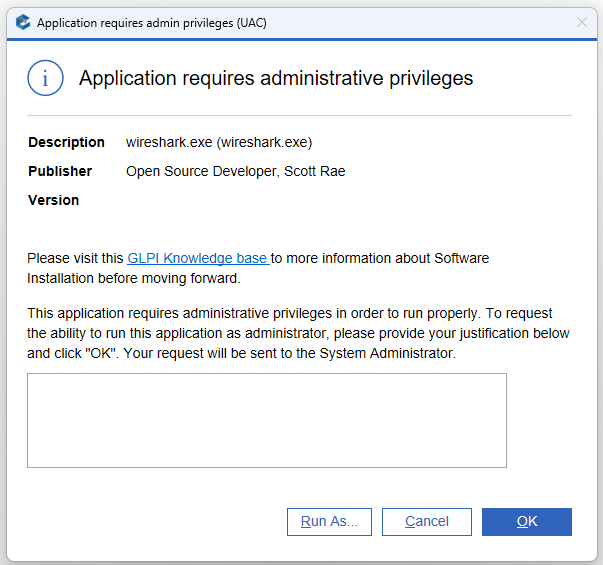
If the application you are trying to install meets these requirements:
1 - Trust - The Software was downloaded from a trusted source and is duly signed.
2 - Licensing - The Software must be free for Commercial Use or the Company has Licensing.
3 - Updates - Software have regular updates and its not dependent on legacy components.
4 - Redundancy - A tool with similar functionality cannot exist in actual Authorized Software List (1.1).
If you have a valid justification, you must fill it in and click OK. Automatically, a ticket will be opened with your request, which will be analyzed by a support technician. The privileges to carry out the action will be granted to you if the is duly justified and meets security requirements. You will receive feedback and know that your request was authorized through the ticket.
2 - Request for Privileges
Whenever the user tries to perform a task in the Operating System that is not pre-authorized, a window will appear asking for a justification identical to that in section 1.2.
If you have a valid justification, you must fill it in and click OK. Automatically, a ticket will be opened with your request, which will be analyzed by a support technician.
2.1 - MMC Snap-ins
Pre-authorized snap-ins are available from the Start Menu or Control Panel. Snap-ins that require Administrator privileges, such as Services and Machine Certificates, will be automatically elevated.
Mounting Snap-ins with elevation from the mmc.exe command is not allowed.
Other actions that require elevation in Snap-ins, such as Services, can be performed if the user opens the Snap-in as an administrator and then executes the actions.
2.2 - Registry
Import Keys that require elevation can be done if the user opens Regedit as an Administrator and then imports the key.
3 - Security Policies
This tool also validates the behavior of some applications and can block certain user actions.
Whenever CyberArk EPM blocks a task, the following Pop-Up is displayed on notification area.
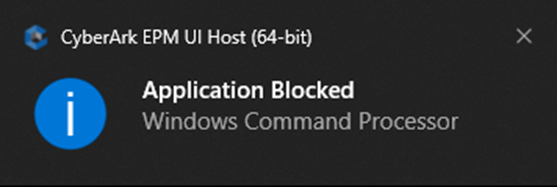
Most of these situations are related to Browser Plugins or Office 365 Applications that are not properly Signed.
If the user receives this notification and is prevented from carrying out a relevant task, please report the situation via ticket.
4 - Scripts
Running Scripts as administrator from Windows Explorer is not allowed.
Alternatively, you can open a command line or powershell as administrator and then invoke the Script.
Script instructions that require administrator privileges are executed with elevation if rules exist.
If you have any problems executing Scripts please place a ticket on GLPI.